 |
|
You are here: Foswiki>Development Web>WebPreferences (14 Feb 2019, MichaelDaum)Edit Attach
Development Web Preferences
The following settings are web preferences of the Development web. These preferences overwrite the site-level preferences in System.DefaultPreferences and Main.SitePreferences, and can be overwritten by user preferences (your personal topic, eg: WikiGuest in the Main web).CommentPlugin
- Per community vote in CommentPluginDiscussion there is a clear majority that wants it enabled or just don't care. And as Michael Daum has rightfully observed people still threadmode discuss. So I am reenabling the plugin and instead removing COMMENT from the templates where we do not want to encourage its use. -- KennethLavrsen.
Web Preferences Settings
These settings override the defaults for this web only. See full list of defaults with explanation. Many of the settings below are commented out. Remove the # sign to enable a local customisation.- List of topics of the Development web:
- #Set WEBTOPICLIST = %WEBTOPICLIST%
- Web-specific background color: (Pick a lighter one of the StandardColors).
- Set WEBBGCOLOR = #d3f6ff
- Note: This setting is automatically configured when you create a web
- Image, URL and alternate tooltip text of web's logo.
Note: Don't add your own local logos to the ProjectLogos topic; create your own logos topic instead. Note: Don't add your own local logos to the ProjectLogos topic; create your own logos topic instead.- #Set WEBLOGOIMG =
- #Set WEBLOGOURL = http://foswiki.org/Home/WebHome
- #Set WEBLOGOALT = Powered by Foswiki, The Free and Open Source Wiki
- #Set WEBLOGOIMG =
- List this web in the SiteMap. If you want the web listed, then set SITEMAPLIST to
on, do not set NOSEARCHALL, and add the "what" and "use to..." description for the site map. Use links that include the name of the web, i.e. Development.Topic links.
Note: Unlike other variables, the setting of SITEMAPLIST is not inherited from parent webs. It has to be set in every web that is to be listed in the SiteMap
- Set SITEMAPLIST = on
- Set SITEMAPWHAT = Developer discussions and supplementary documentation
- Set SITEMAPUSETO = Discuss development and find supplementary documentation
- Note: Above settings are automatically configured when you create a web
- Exclude web from a
web="all"search: (Set toonfor hidden webs).- Set NOSEARCHALL =
- Note: This setting is automatically configured when you create a web
- Prevent automatic linking of WikiWords and acronyms (if set to
on); link WikiWords (if empty); can be overwritten by web preferences:- #Set NOAUTOLINK =
- Note: You can still use the
[[...][...]]syntax to link topics if you disabled WikiWord linking. The<noautolink> ... </noautolink>syntax can be used to prevents links within a block of text.
- Default template for new topics for this web:
- WebTopicEditTemplate: Default template for new topics in this web. (Site-level is used if topic does not exist)
- System.WebTopicEditTemplate: Site-level default topic template
- Comma separated list of forms that can be attached to topics in this web. See DataForms for more information.
- Set WEBFORMS = BasicForm, ChangeProposalForm, UserExperienceProjectForm
- Users or groups who are not / are allowed to view / change / rename topics in the Development web: (See AccessControl).
- Set DENYWEBVIEW =
- Set ALLOWWEBVIEW =
- Set DENYWEBCHANGE =
- Set ALLOWWEBCHANGE =
- Set DENYWEBRENAME =
- Set ALLOWWEBRENAME =
- Users or groups allowed to change or rename this WebPreferences topic: (e.g., AdminGroup)
- Set ALLOWTOPICCHANGE = AdminGroup, MaintainGroup
- Set ALLOWTOPICRENAME = nobody
- Web preferences that are not allowed to be overridden by sub-web, user or topic preferences:
- Set FINALPREFERENCES = NOSEARCHALL, ATTACHFILESIZELIMIT, WIKIWEBMASTER, WEBCOPYRIGHT, WEBTOPICLIST, DENYWEBVIEW, ALLOWWEBVIEW, DENYWEBCHANGE, ALLOWWEBCHANGE, DENYWEBRENAME, ALLOWWEBRENAME
- Set VIEW_TEMPLATE = View
Tools

Preference Settings
A preference setting lets you define a simple macro that will be expanded in your output. In addition:- preference settings are used by Plugins to control their features,
- preference settings are used for Access Control.
[multiple of 3 spaces] * [space] Set [space] MACRONAME [space] = [space] value
Example:
* Set WEBBGCOLOR = #FFFFC0Macros defined using preference settings are expanded by enclosing their name in percent signs. So when you write
%WEBBGCOLOR%, it gets expanded to =#d3f6ff =
Preferences can also be set dynamically by using the %SET{"setting" value="value"}% Macro. With the exception of these dynamic preference settings, preferences are always taken from the most current topic revision, even when accessing previous revisions of a topic.
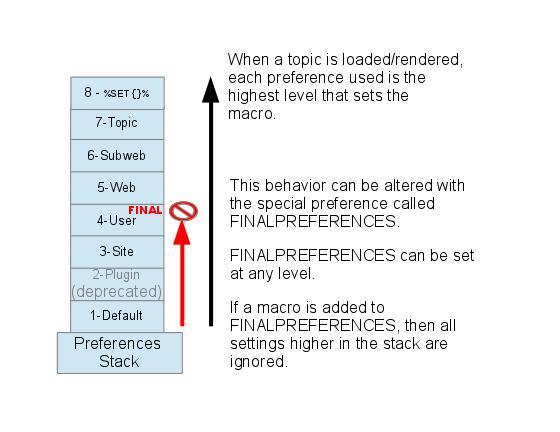
Preferences can be defined in a number of places: - DefaultPreferences (Foswiki upgrades overwrite this topic)
- In (some) plugin documentation topics. (Deprecated)
- SitePreferences
- In user topics, if the user has one (yours is Main.WikiGuest)
- WebPreferences in each web.
- Sub-webs inherit the WebPreferences of their parent
- In the topic when it is loaded from the Store
- In SET macros for run-time preferences
Set statements which occur at numerically higher locations override macros of the same name defined at lower numbered levels, unless the macro was listed in a finalpreferences setting (finalised) at a lower-numbered level. When a preference is finalized, the macro is locked to the value at that level; SET statements at higher-numbered levels are ignored. Looking at it graphically:
 Access Control rules (ACLs) are also written as preference settings. ACLs cannot be dynamically modified by the
 %SET{}% macro.
Writing preference settings
Preference settings are written as a simple bullet. In TopicMarkupLanguage (TML) they are written as3-spaces,asterisk,equals,value
* Set MYSETTING = My setting valueWhen using the Wysiwyg editor, click the "Bullet" button and write the setting as a simple bullet. Don't include the asterisk or the leading spaces. Spaces between the = sign and the value will be ignored. You can split a value over several lines by indenting following lines with spaces - as long as you don't try to use * as the first character on the following line. (Not when using the Wysiwyg editor.) Example:
   * Set MACRONAME = value starts here
     and continues here
 preference settings can easily be disabled with a # sign. Example:
* #Set DENYWEBCHANGE = %USERSWEB%.UnknownUserWhatever you include in your bullet style setting will be expanded on display, exactly as if it had been entered directly (though see Parameters, below). (
%SET{}% settings are expanded during the set process. See VarSET for further information.)
Example: Create a custom logo macro - To place a logo anywhere in a web by typing
%MYLOGO%, define the preference settings in the web's WebPreferences topic, and upload a logo file, ex:mylogo.gif. You can upload by attaching the file to WebPreferences, or, to avoid clutter, to any other topic in the same web, e.g.LogoTopic. Sample preference setting in WebPreferences:
* Set MYLOGO = %PUBURL%/%WEB%/LogoTopic/mylogo.gifPreference settings are case sensitive. (Foswiki by convention always writes settings in upper case.)
   * Set lower = This is LOWER
   * Set LOWER = This is UPPER
   * Set LoWeR = This is MIXED
Expand %lower%, %LOWER% and %LoWeR%
Expand %lower%, %LOWER% and %LoWeR%.
Hiding preference settings
You can hide preference settings in the output by enclosing them in HTML comments; for example,<!-- * Set HIDDEN = This will be invisible in the output -->You can also set preference settings in a topic by clicking the link
Edit topic preference settings under More topic actions. Preferences set in this manner are known as 'meta' preferences and are not visible in the topic text, but take effect nevertheless.
If the same setting appears as both an inline setting, and in topic meta settings, the meta setting will override the inline setting! There is no warning when the setting is duplicate. This should be avoided to prevent confusion.
 Caution If your topic will be used in an INCLUDE, it is recommended to not use HTML comments. instead, set preferences
into the topic metadata by using the "Edit Settings for this topic" button on the "More topic actions" page. Settings in an included topic are always ignored, but nested comments will break the HTML.
Caution If your topic will be used in an INCLUDE, it is recommended to not use HTML comments. instead, set preferences
into the topic metadata by using the "Edit Settings for this topic" button on the "More topic actions" page. Settings in an included topic are always ignored, but nested comments will break the HTML.Order of preference settings
If you are setting a preference and using it in the same topic, note that Foswiki reads all the bullet style preference settings from the saved version of the topic before it displays anything. This means you can use a setting anywhere in the topic, even if you set it at the very end. But beware: it also means that if you change the setting of a macro you are using in the same topic,Preview will show the wrong thing, and you must Save the topic to see it correctly.
If a preference is set in both a bullet and in META settings, the META will override the bullet.
If multiple bullet style Set statements are specified for the same preference, the last one encountered is assigned and will be used globally throughout the topic.
%SET{}% style settings are assigned during the topic rendering. So unlike bullet/META settings: - Preferences and their effect will be visible in the preview.
-
%SET{}will override both META and bullet style settings unless the preference is FINALIZED. - The
%SET{}is positional in the topic. Multiple%SET{}macros for the same preference will change the value as the topic is rendered.
Preference settings and topic revision history
Foswiki always reads the bullet style settings from the most current topic revision, so viewing older revisions of a topic can show unexpected results.Preference settings and INCLUDE
- Bullet and META style preference settings are never set when topic content is obtained by
%INCLUDE{. -
%SET{style settings can be overidden when an INCLUDE is expanded, but only when referenced locally in the included topic.
Parameters
The following block of code was read from PreferenceSettings, and the "Set" statements were defined in WebPreferencesMacros defined using preference settings can take parameters. These are symbols passed in the call to the macro to define local macros that will be expanded in the output. For example, Both Macros and PreferenceSettings have a Set statement that defines theNote that %CONDITIONS% expands differently when this example is viewed in Macros. This is because Set statement are not active in included topics. The including topic's set statements are used.%CONDITIONS%macro as shown here:* Set CONDITIONS = According to [[%TOPIC%]] the %WHAT% is %STATE% today (Set in ...).The%TOPIC%shows where the CONDITIONS macro is expanded, and the ... shows where the Set statement was actually defined. You can call this macro passing in values forWHATandSTATE. For example:
%CONDITIONS{WHAT="sea" STATE="choppy"}%
- expands to
%CONDITIONS{WHAT="sea" STATE="choppy"}%
Parameter defaults
- The special parameter name
DEFAULTgets the value of any unnamed parameter in the macro call. - Parameter macros can accept a
defaultparameter so that they expand to something even when a value isn't passed for them in the call.
* Set WEATHER = It's %DEFAULT{default="raining"}%. -
%WEATHER%expands to%WEATHER% -
%WEATHER{"sunny"}%expands to%WEATHER{"sunny"}%
Note that parameters override all other macros, including system defined macros, in the expansion of the macro where they are used.
Access Control Settings
These are special types of preference settings to control access to content. AccessControl explains these security settings in detail. Parameters are not available in access control settings. AccessControl settings cannot be set or changed by the%SET{}% macro.
Local values for preferences
Certain topics (user, plugin, web, site and default preferences topics) have a problem; macros defined in those topics can have two meanings. For example, consider a user topic. A user may want to use the wiki text editor, but only when editing their home topic. The rest of the time, they want to use the default Wysiwyg editor. This separation is achieved usingLocal in place of Set in the macro definition. For example, if the user sets the following in their home topic:
* Local NOWYSIWYG = 1Then, when they are editing any other topic, they will get the Wysiwyg editor. However, when they are editing their home topic they will get the wikitext editor.
Local can be used wherever a preference needs to take a different value depending on where the current operation is being performed.
%SHOWPREFERENCE% can be used to get a listing of the values of all macros in their evaluation order, so you can see macro scope if you get confused.
%SHOWPREFERENCE{"CONDITIONS"}% expands into: - Set CONDITIONS = ""
Related Topics
- System.DefaultPreferences, Main.SitePreferences - site-level preferences
- WikiUsers - list of user topics. User topics can have optional user preferences
- Macros - what macros are and how to use them, including a list of common macros
- AccessControl - explains how to restrict access by users or groups


| I | Attachment | Action | Size | Date | Who | Comment |
|---|---|---|---|---|---|---|
 ico ico |
favicon.ico | manage | 318 bytes | 20 Nov 2004 - 18:14 | ProjectContributor | placeholder favicon |
Edit | Attach | Print version | History: r32 < r31 < r30 < r29 | Backlinks | View wiki text | Edit wiki text | More topic actions
Topic revision: r32 - 14 Feb 2019, MichaelDaum


The copyright of the content on this website is held by the contributing authors, except where stated elsewhere. See Copyright Statement.  Legal Imprint Privacy Policy
Legal Imprint Privacy Policy