Kino Search Contrib
KinoSearch is a Perl implementation of the
Apache Lucene search engine (implemented in Java). This is the implementation of this indexed search engine for Foswiki. With KinoSearch you create an index over all webs including attachments like Word, Excel and PDF. Based on that you get a really fast search over all topics and the attachments. You need this contrib if:
- your wiki has grown so big, that default search is too slow or
- you want to do search not only on the topics but also the attachments.
Screenshot

Usage
See the
KinoSearch topic for user documentation.
Searching With Kinosearch
The
kinosearch script uses a template called
kinosearch.tmpl to render the results. You can override it in the same way as any other templates (i.e. create
kinosearch.yourskin.tmpl,
Set SKIN = yourskin,pattern).
There is also the
KinoSearch topic with a form ready to use with the
kinosearch script.
If you have the
Foswiki:Extensions/KinoSearchPlugin, you can use the rest handler instead. The syntax is identical to the
kinosearch script.
-
http://foswiki.org/bin/rest/KinoSearchPlugin/search
-
cd foswiki/bin ; ./rest KinoSearchPlugin.search
Note: Rest handlers currently require the user to be authenticated. If you want unauthenticated users to search, use the
kinosearch script instead.
The following form submits a query to the
kinosearch script. The installation instructions are detailed below.
Integrating KinoSearch into Foswiki's Internal SEARCH (experimental)
By setting
$Foswiki::cfg{RCS}{SearchAlgorithm} = 'Foswiki::Store::SearchAlgorithms::Kino'; (a setting in the
Store settings section in
configure),
Foswiki will use the
KinoSearch index for any inbuilt search (including
WebSearch) that it can (for regex searches it will fall back to the
Forking search algorithm).
If you want Foswiki's
WebSearch to also show you attachment results (when you select the 'Both body and title' option), you need to also set
{KinoSearchContrib}{showAttachments}=1, and add
kino to the front of your
SKIN setting.
The reason this feature is experimental, is that kinosearch does not do partial matching, so searching for
TAG will not match text like
%TAG{"something"}%, only instances where the word TAG is seperated by whitespace. Foswiki's SEARCH expects total partial matching.
Note: This currently only works for Foswiki
1.0.x.
RSS 2.0 feeds can be set up for any search results. To access the feed append
&rss=on;skin=none to the end of the search url. There is a link to the feed from the results page in the default templates.
Indexing
Creating a New Index
Each topic's text body, title, form fields and attached documents are indexed.
You should run this script manually after installation to create the index files used by KinoSearch.
You can also schedule a weekly or monthly crontab job to create the index files again, or execute it manually when you take down your server for maintenance tasks. To prevent browser access, it has been placed out of the public bin folder.
-
cd foswiki/tools/ ; ./kinoindex
Updating the Index
The
kinoupdate script uses the web's
.changes files to know about topic modifications. Also, a
.kinoupdate file is used on each web directory storing the last timestamp the script was run on it. So when this script is executed, it first checks if there are any topic updates since last execution. The most recent topic updates are removed from the index and then reindexed again.
-
cd foswiki/tools/ ; ./kinoupdate
This script should be executed by an hourly crontab. As before, this script has been placed out of the public bin folder.
# m h  dom mon dow   command
35  *  *   *   *     cd /path/to/your/foswiki/tools/ ; ./kinoupdate
Attachment File Types to be Indexed
This extension uses the
Foswiki:Extensions.StringifierContrib to index attachments. By default, the following file types are indexed:
-
.txt
-
.html
-
.xml
-
.doc
-
.docx
-
.xls
-
.xlsx
-
.ppt
-
.pptx
-
.pdf
You can change this with the
$Foswiki::cfg{KinoSearchContrib}{IndexExtensions} setting in
configure.
If you add other file extensions, they are treated as ASCII files. If needed, you can add more specialised stringifiers for further document types (see
Indexing further document types).
All form fields are indexed. For this, the form templates are checked and the included fields are indexed. Additionally the name of the form of a topic is stored in the field
form.
Note: With
kinoupdate only the form fields that existed at the time the initial index was created are indexed. Thus if you add a form or if you add a new field to an existing form, you should create a new index with
kinoindex.
Installation Instructions
You do not need to install anything in the browser to use this extension. The following instructions are for the administrator who installs the extension on the server.
Open configure, and open the "Extensions" section. Use "Find More Extensions" to get a list of available extensions. Select "Install".
If you have any problems, or if the extension isn't available in
configure, then you can still install manually from the command-line. See
http://foswiki.org/Support/ManuallyInstallingExtensions for more help.
You only need the
Foswiki:Extensions/KinoSearchPlugin if you are using the
rest handlers, or the
%KINOSEARCH% macro. Otherwise you are fine without it.
There are additional packages required as listed in the dependencies under
Contrib Info.
Configuration
There are a number of settings that need to be set in
configure before you can use the Contrib.
Test of the Installation
- Test if the installation was successful:
- Change the current directory to the
tools Foswiki installation directory.
- Run
./kinoindex
- Once finished, open a browser window and point it to the
System.KinoSearch topic.
- Just type a query and check the results.
Upgrading From SearchEngineKinoSearchAddOn
If you previously used the SearchEngineKinoSearchAddOn (either on TWiki or on Foswiki), you will have noticed that this has been repackaged as a Contrib in line with Foswiki standards. The plugin is available seperately at
Foswiki:Extensions/KinoSearchPlugin
You will also need to move your settings from
Main.SitePreferences into
configure.
Finally, the following settings have been renamed:
-
$Foswiki::cfg{KinoSearchLogDir} --> $Foswiki::cfg{KinoSearchContrib}{LogDirectory}
-
$Foswiki::cfg{KinoSearchIndexDir} --> $Foswiki::cfg{KinoSearchContrib}{IndexDirectory}
Contrib Info
| Author(s): |
Foswiki:Main.MarkusHesse, Foswiki:Main.SvenDowideit & Foswiki:Main.AndrewJones |
| Copyright: |
© 2007 Foswiki:Main.MarkusHesse; © 2009 - 2011 Foswiki Contributors |
| Release: |
1.31 |
| Version: |
11720 (2011-05-18) |
| Change History: |
|
| 18 May 2011: |
v 1.31, Foswikitask:Item10765: use API rather than read .changes file directly -- Foswiki:Main.AndrewJones |
| 16 May 2011: |
v 1.30, Foswikitask:Item10746: Index shouldn't crash on bad WEBFORMS setting; Foswikitask:Item10742: Should not display search score as part of results -- Foswiki:Main.AndrewJones |
| 13 Apr 2011: |
v 1.29, Foswikitask:Item10291: use !KinoSearch1 library -- Foswiki:Main.AndrewJones |
| 25 Mar 2011: |
v 1.28, Foswikitask:Item9731: fix searching on form:NameOfSomeForm; Foswikitask:Item8632: move kinosearch/ to working/work_areas/KinoSearchContrib; remove unused config -- Foswiki:Main.AndrewJones |
| 01 Dec 2010: |
Foswikitask:Item9311: using Stringifier instead of StringifierContrib; minor improvements rendering search results -- Foswiki:Main.MichaelDaum |
| 04 Sep 2010: |
v 1.27, Use the ICON macro as it is documented, instead of calling a function that was removed in 1.1. Also $websStr can be undef in searchStringForWebs(), so it is best to check that it is defined before testing it with a regex. -- Foswiki:Main.MichaelTempest |
| 14 Jul 2010: |
v 1.26, removed the ks_test_ script. Use the stringify script from Foswiki:Extensions.StringifierContrib instead |
| 06 Jun 2010: |
v 1.25, Foswikitask:Item8629: refactored to use Foswiki::Extensions.StringifierContrib -- Foswiki:Main.AndrewJones |
| 14 Apr 2010: |
v 1.24, Foswikitask:Item8426: fix typo in Index.pm |
| 11 Mar 2010: |
v 1.23, Foswikitask:Item8581: fix executable permission bits, fix typos, add dependency CPAN:Text::Iconv, flushes log files, move kinosearch/bin files to standard tools location -- Foswiki:Main.WillNorris |
| 04 Nov 2009: |
v 1.22, Foswikitask:Item2326: small documentation improvent -- Foswiki:Main.IngoKappler |
| 24 Sep 2009: |
v 1.21, Foswikitask:Item1363: port to Foswiki -- Foswiki:Main.WillNorris. Rename to KinoSearchContrib and split plugin into KinoSearchPlugin; add stringifiers for .docx, .pptx and .xlsx; change the kinosearch script to work with FSA; Moved settings into configure; Commands now set in configure; Replaced system() calls with Foswiki::Sandbox->sysCommand(); Handle passworded MS Office files; Make the index more robust if it somehow encounters binary files; Can now specify skipped topics; updated and simplified docs; added doc for TipsContrib; update templates; Foswikitask:Item8246: fix checking of access controls -- Foswiki:Main.AndrewJones |
| 06 Nov 2008: |
v 1.20, minor revert to stop crash |
| 05 Nov 2008: |
v 1.19, fixes for (nex)twiki/trunk |
| 20 Aug 2008: |
v 1.18, added Integrated SEARCH, SearchEngineKinoSearchPlugin, restHandlers, updated code and tests -- Foswiki:Main.SvenDowideit |
| 6 Aug 2008: |
v 1.17, TWikibug:Item5717: persist use form choices, TWikibug:Item5647: cope better with attachment problems -- Foswiki:Main.SvenDowideit |
| 4 Jun 2008: |
v 1.16, TWikibug:Item5646: Problem with attachments with capital letter suffix |
| 12 May 2008: |
v 1.15, TWikibug:Item5579, TWikibug:Item5580, TWikibug:Item5619: Problem with ALLOWWEBVIEW and Forms fixed |
| 23 Apr 2008: |
v 1.14, TWikibug:Item5273, TWikibug:Item5546, TWikibug:Item5550, TWikibug:Item5552: Use current user in search script |
| 27 Jan 2008: |
v 1.13, TWikibug:Item5271: Option "show locked topics" now works |
| 19 Jan 2008: |
v 1.12, TWikibug:Item5270: Enhancement of stringifiers |
| 19 Dec 2007: |
v 1.11, Additions on stringifiers, modification of output format |
| 17 Nov 2007: |
v 1.10, PPT stringifier added |
| 11 Nov 2007: |
v 1.09, Some bugfixing |
| 3 Nov 2007: |
v 1.08, Some bugfixing |
| 7 Oct 2007: |
v 1.07, Some bugfixing |
| 6 Oct 2007: |
v 1.06, Upgrade for 4.1, Release with Foswiki:Extensions.BuildContrib |
| 29 Sep 2007: |
v 1.05, Indexing of form fields |
| 16 Sep 2007: |
v 1.04, Stringifier plugins for doc, xls and html |
| 13 Sep 2007: |
v 1.03, Indexing of PDF and TXT attachments |
| 08 Sep 2007: |
v 1.02, Index and update script enhanced |
| 24 Aug 2007: |
v 1.01, Update script included, Result uses highlighter |
| 14 Aug 2007: |
Initial version (v1.000) |
| Dependencies: |
| Name | Version | Description |
|---|
| Foswiki::Contrib::StringifierContrib | >0 | Required for indexing attachments | | KinoSearch1 | >0 | Required | | Error | >0 | Required | | Time::Local | >0 | Required | | IO::File | >0 | Required |
|
| Add-on Home: |
http://foswiki.org/Extensions/KinoSearchContrib |
| Support: |
http://foswiki.org/Support/KinoSearchContrib |

 KinoSearchContrib is not installed on Foswiki.org.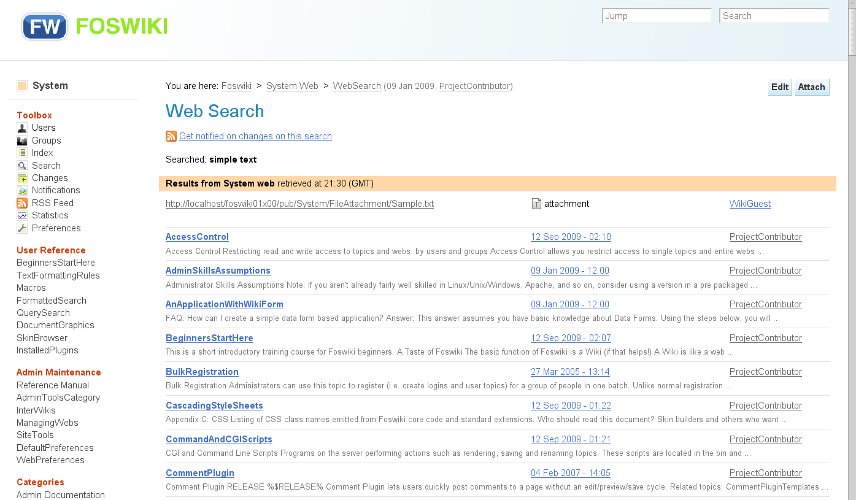


 jpg
jpg  md5
md5  tgz
tgz 


 Legal Imprint Privacy Policy